Here's a recent $50 Project I completed for a client: a simple, straightforward UPC barcode image generator. Now, many of you might be groaning, thinking, "Come on, Excel_Geek, there are hundreds of barcode add-ins and software packages out there that work with Excel." And you're right. What's wrong with them? Nothing really. This client simply wanted his own ultra-simple Excel-based solution -- something he could input a number into and get an image he could use.
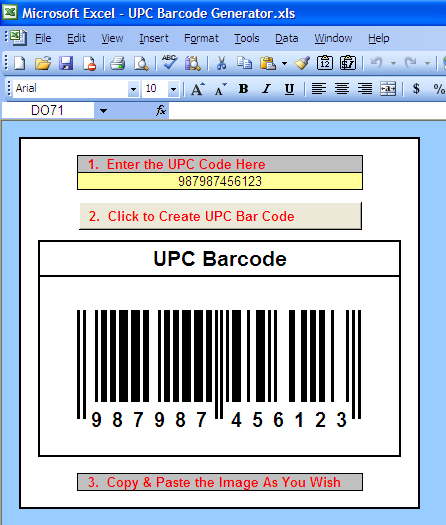
Here's a look at what I built:
(Click on the image above to open it larger in another window.)
How's it work? Basically I created a range containing cells with very narrow column widths and used conditional formatting to change the background color of the cells to either black or white, depending upon the value in the cells (either "TRUE" or "FALSE") which I obtained using VLOOKUP formulas to grab the appropriate value for each digit in the code from a table containing them.
Then once the "live" version of the barcode is set, I use Excel's little known "camera" feature (copy a range then hold down shift when selecting the Edit menu and you'll find it -- this feature is gone in Excel 12 :-( ) to copy the range containing the barcode and paste it as a copy-pastable image.
It was remarkably simple once I understood how UPC barcodes work.
To my Excel_Geek Insiders (who'll be receiving this file soon as part of your subscription), unhide the hidden rows if you really want to to see the "guts" of how this works.
Later,
Excel_Geek
Showing posts with label Camera Feature. Show all posts
Showing posts with label Camera Feature. Show all posts
Monday, February 26, 2007
UPC Barcode Generator

Subscribe to:
Posts (Atom)


