Showing posts with label Conditional Formatting. Show all posts

Monday, April 23, 2012

Highlight First Blank Cell With Conditional Formatting

Hey, just wanted to share a quick trick about conditional formatting.

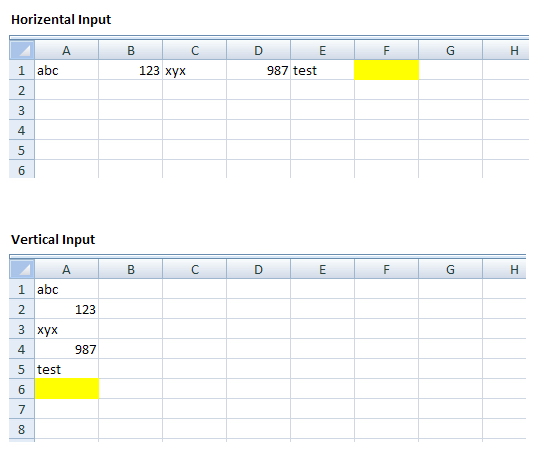
If you have a data entry sheet with input in adjacent cells within the same row or column, and you want the next blank input cell to be highlighted with a color, you can apply conditional formatting based on a formula.


The following formulas assume that your input is starting from cell A1 and all the input is in adjacent cells:
  • Vertical data entry:   =ROW(A1)=COUNTA(A:A)+1
  • Horizontal data entry:   =COLUMN(A1)=COUNTA(1:1)+1
If there are empty cells before the actual input range, you need to modify the formula. Increase the "+1" with every empty cell above (or to the left of) the actual input range. This type of conditional formatting can be applied on the entire column, entire row, or custom range, and there would only be one highlighted cell at a time.

Excel Geek insiders will get the sample file from Eric.

Sunday, February 27, 2011

Heat Charts are so easy in Excel 2007

Before you roll your eyes and say, "Welcome to life after 2003, Excel_Geek," let me just say, "I know, I know." The driver for this project was that I was analyzing my website traffic using my Google Analytics account. I noticed a few things.

One was that "heat chart" or "heat charts" seems to be a pretty popular search term for folks to find me. I've obviously done a couple of heat chart projects, but back when I was still using 2003, so in order to create them with more than four colors (the limit to Conditional Formatting in 2003), I had to do write some VBA code to accomplish it.

Another thing I noticed what the rhythmic up and down of my site traffic. There were a few major spikes -- March Madness season, college football bowl game season, and one recently when @MSExcel mentioned me in their Twitter feed. What I wanted to further analyze, though, was if there was any pattern to traffic patterns based on Day of Week and recency of blog posts.

I combined these two findings and decided to do a heat chart incorporating both Day of Week and recency to blog posts. Here's what the chart itself looks like:


Along the way I used some other favorite techniques along the way: indexing the data (so I'm not sharing my actual web stats...hey, that's my business), a trick to convert a list of dates into a list of days of the week, VLOOKUP using TRUE instead of FALSE (whatever for? right?), and using SUMPRODUCT to create COUNTIFS and SUMIFS functions that will be backward compatible to Excel 2003 and earlier. I highlighted the creation of the heat chart and these other techniques in the source file, which I'll be sharing with my Insiders Subscribers.

Later,

Excel_Geek

Wednesday, February 27, 2008

Conditional Indenting

I recently did a quick $50 Project for a long-time client who wanted a certain spreadsheet to have the feature where if there was any value in column B, the formatting of column A in the same row would be indented by 1. Since the built-in conditional formatting cannot do this, it took a few lines of VBA.

Simple and straightforward.

Enjoy the file, Excel_Geek Insiders.

Later,

Excel_Geek

Friday, August 12, 2005

Geez..that was fast...my first $50 project

Boy, maybe I should rethink this $50 thing...

Within hours of making this change, I've already received my first request, completed the project, and have sent the code to the requestor.

Jim, I hope it does exactly what you asked for. I pretty sure it does.

What Jim needed was a macro in an Excel file that would check each cell in a selected range, and color-code the text in the cell based upon these criteria:

  • If the cell contained a numeric value that's not a formula, it's red.

  • If the cell contained a numeric value that is a formula, but only because it's preceded with an equal sign, it's green.

  • If the cell contained a numeric value that is a formula with operators other than merely having an equal sign, it's blue.

Using a regular expression, the isNumeric function, some nested If_Then_Else's, and a few other things, I think I nailed it down pretty good.

Thanks for the project, Jim, and for $50.