Looking for 2014 brackets? Check here.
I thought I'd continue to stoke the excitement fire for March Madness 2013! Many of you know that besides college football bowl season, March Madness is the biggest event for ExcelGeek.com each year.
To reiterate from my last post, this year the ExcelGeek.com March Madness bracket situation will work like year's past. Once Selection Sunday is over, I'll post this year's bracket files -- both the "Master" file that pool organizers use and the "Picks" file that individual participants in pools use to track how they're doing and to send to the organizers to make it easier for them to input picks into the "Master".
I'll also be using the same online file registration process as last year. That really worked well. If you don't remember it, how it works is that you FIRST download the Master bracket file (the one pool organizers use to manage the pool) and open it (with macros enabled). It provides a Lock Code. Then you click the PayPal button link to submit payment of $2.00. It's at that time that you provide the Lock Code. Once your payment is confirmed, you'll be provided with a Key Code. With that key code you'll unlock all the wonder that is the ExcelGeek.com March Madness Master bracket file.
Awesome, right?
So...what are you supposed to do between now and this coming Sunday night?
Here's another interesting March Madness pool sheet I just did for a client. This one involves randomly assigning participants to each of the 68 teams in the tournament. Then, the winners of each game are determined by the final score vs. the official betting line on the game. Example: If you've got Missouri in a match-up vs. Duke, and Duke's favored by 5, you win so long as Missouri beats the spread. In the event your team actually wins the game and beats (or matches -- a "push") the spread, you advance with your team to the next round. If your team loses, but beats the spread, you advance to the next round AND (here's the fun part) you steal the loser's team (since they won the game). Fun, right? Anyway, you can do different payouts for wins at each round of the tournament, and this client wanted to actually do pay-outs for the Championship loser and Semifinal losers, too, so I built that in. All in all, it was another example of a pool where your ability to pick teams is not really a factor. It's about your luck.
I believe this client is still rounding up participants for the pool. If you're interested, let me know and I'll pass along his email address.
Excel_Geek Insiders Subscribers, I'll send along a copy of that file.
Later,
Excel_Geek
Wednesday, March 13, 2013
Build Up to March Madness 2013 - Another Crazy Pool Format

Monday, March 11, 2013
Getting Excited for March Madness 2013? An Appetizer
Looking for 2014 brackets? Check here.
Hey folks! Are you getting excited for March Madness 2013? You know I am. Many of you know that besides college football bowl season, March Madness is the biggest event for ExcelGeek.com each year.
This year will be a like year's past. Once Selection Sunday is over, I'll post this year's bracket files. I'll also be using the same online file registration process as last year. That really worked well. If you don't remember it, how it works is that once you've downloaded the Master bracket file (the one pool organizers use to manage the pool) and open it (with macros enabled) it provides a Lock Code. When you submit payment of $2.00 via PayPal, you'll have a place to type or copy-paste in that code. You'll then be provided with a Key Code. With that key code you'll unlock all the wonder that is the ExcelGeek.com March Madness Master bracket file.
Awesome, right?
So...what are you supposed to do between now and this coming Sunday night? Well, I just recently created a different kind of March Madness pool sheet for a client. It's a whole different animal than the typical bracket challenge type pool that I've done in the past. It uses a 10x10 grid format where the top axis of the matrix corresponds to the last digit of the winning team's score at the end of regulation and the left axis corresponds to the losing team's score at the end of regulation. Participants are assigned, randomly, the number of squares in the grid that they've purchased/earned/were given. Then the numbers along the top and left sides are randomly sorted. Having the correct square for each game awards that participant an increasing number of points or money from round to round. It's a pretty cool arrangement. It keeps everyone interested all the way through, even if your pickem' teams have long been beat out.
I believe this client is still rounding up participants for the pool. If you're interested, let me know and I'll pass along his email address.
Excel_Geek Insiders Subscribers, I'll send along a copy of that file.
Later,
Excel_Geek
Monday, December 17, 2012
Excellent use of Excel for Heat Mapping of Data
Best quote from the article: "John Nelson's charts and maps on traffic fatalities are a reminder that a good data [visualization] doesn't always require graphic design chops -- or software."
And how!
Check out the rest of the article to see some really lovely heat maps. If you want that powerful pattern recognition factor built right into the human brain to work, feed it visuals like this.
Thought you'd all enjoy,
Excel_Geek
Updated: I forgot to link to some of my own Heat Chart related stuff.
Saturday, December 15, 2012
Inventor of the Barcode Dies
Monday, December 03, 2012
2012-13 College Football Bowl Pool Spreadsheets
Sorry for the wait, folks. Here are this year's college football bowl season pool files. Enjoy!
http://www.excelgeek.com/downloads/collegebowls/2012-13_Bowl_Pool_Summary_revb.xls
http://www.excelgeek.com/downloads/collegebowls/2012-13_Bowl_Pool_Entry_Form.xls
For the uninitiated, the "Summary" file is the one the manager of the pool will use to keep track of everyone's picks and points. The "Entry Form" is the file the manager of the pool sends out to the participants, so they can make picks and assign points. Then the manager can copy-paste them into the "Summary" file.
Also, I routinely get requests for a version of this file with room for more participants. While I haven't updated the "expanded" version to this year's teams and bowls yet, you can yourself. Here's where I posted that version:
click here
UPDATED: I've since fixed the issue some folks (who've commented on this post) were having relative to picks not being displayed in the Individual Charts tab for users #21 and above. I've also added in the feature requested by one commenter for calculating negative confidence points for incorrect picks. Good idea, I thought. I added a user option to select either "Zero" or "Negative" for points for incorrect picks. Check it out.
Wednesday, November 07, 2012
Single Question Post-Election 2012 Survey
I don't get all political very often, but this morning I've got a burning curiosity. (And I apologize in advance to my international readers for my US-centric focus here.)
You have experienced the past four years. You've awaken this morning to see the same President in office and the balance of power in Congress largely the same. How optimistic or pessimistic are you about the next four years?
Take my single question post-election 2012 survey here: http://excelgeek.com/election2012_survey.htm
Monday, April 23, 2012
Highlight First Blank Cell With Conditional Formatting
If you have a data entry sheet with input in adjacent cells within the same row or column, and you want the next blank input cell to be highlighted with a color, you can apply conditional formatting based on a formula.
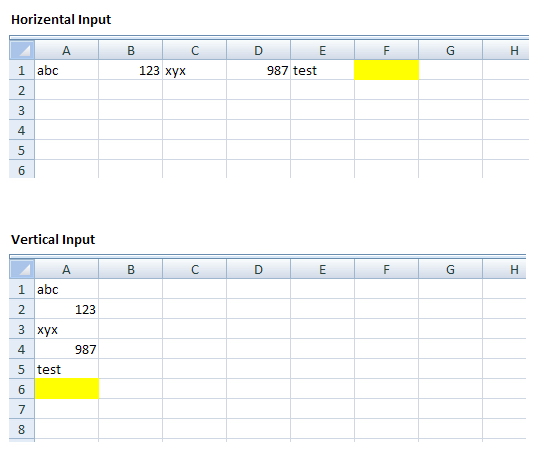
The following formulas assume that your input is starting from cell A1 and all the input is in adjacent cells:
- Vertical data entry: =ROW(A1)=COUNTA(A:A)+1
- Horizontal data entry: =COLUMN(A1)=COUNTA(1:1)+1
Excel Geek insiders will get the sample file from Eric.


