Recently an Excel_Geek reader (we'll call her Sue) emailed me. Sue is interested in trying to manage a blog similar to Excel_Geek, offering services related to Microsoft Office Suite products. She wondered how I got going, where the traffic comes from, etc. So, for this reader (and anyone else who might be interested), here goes:
First, let it be known that this takes some time and effort. The days of turning on the website and being flooded with traffic are just gone (for most of us). I started doing this just over a year ago, and I used to get 2, 3, maybe 5 visits a day...TOTAL. So what'd I do? Simple. I kept posting. I tried to talk about relevant stuff that I really knew about. I focused fairly narrowly on my core of VBA proramming specifically for Excel, and hoped that others might find it useful and/or interesting. Once in awhile I'd post about something a bit off center, and sometimes I would be surprised by the results. Currently, my post about the Yahtzee scorecards I created in Excel for my wife still consistently lands in my top ten content posts of all time. Seriously.
I also introduced myself to others out there with apparent interests and expertise in Excel and VBA programming (see the list of links to the left). Did I view these other experts as potential competitors? At first, but then I realized that we're all playing for the same team: the team that wants more people to understand what they can really do with standard software and a tiny bit of knowledge (and perhaps some of our help from time to time).
Did it work? Slowly at first, but I began to get $50 Project requests. Some were interesting and good fodder to post about, and some were less so. Heck, I did some girl's Excel homework for her for $50. Now the second main aspect of my "marketing" plan was put to the test. Word of mouth. I needed to do a great job (and still need to) on all of these projects, since these people could need help later, and would likely tell their friends, family, and colleagues how they "...got this custom programming done for 50, and it works great.." So far, I'm doing well in this respect.
The $50 Projects kept coming in (and continue to) at a faster rate. And I started to see my clientele moving from novices to intermediate Excel users to true "power users." For the most part today, I do work for those who already know how to do most of what they need done, but they just have one or two issues they can't figure out yet. My style of commenting the heck out of my code, providing explanations as to what I've done and why seems to be a huge "selling point" for me.
With an "audience" starting to build I thought it was time to add some other services for these people. I added Excel_Geek Blog_Mail as a great way for regular readers to get my new posts emailed to them automatically for free without havng to figure our RSS feeds, etc., and I added the Insiders program (probably the greatest value I offer), allowing subscribers to get copies of all my $50 Project files completed for the year for less than $40. These services have helped build my audience.
A recent phenomenon is that I'm seeing more and more Private Project requests. Word has apparently gotten out that companies trying to better integrate Excel (and other apps) into their workflows can get access to quality programming services for $50 per hour. While that's not India or Thailand cheap, that's cheap for those not yet ready to offshore this sort of work. And speaking of other countries and "offshoring", my recent move to recruit programming contributors has yielded fruit in the form of my first contributor (from Singapore) signing up and completing his first project -- ahead of the promised delivery date and in higher quality than I could have hoped for. It seems as though I could end up learning more about VBA from my contributors than they'll learn from me!
That's it. That's what I've done and what I'm doing.
To give you some idea about exactly from where my traffic comes, here are some charts I generated from my Google Analytics account:
Here's where my visitors live (this is a sample of 500 visitors, as that's the largest number that Analytics will display for you):
Here's how my traffic breaks down in terms of referrals:
You can see that nearly half of my traffic is referred by search engines and/or directories, a third is direct (they type in my address or have it bookmarked), and 1 in 5 visitors are referred to my by what I'd consider "relevant content providers" -- that is, by other websites or blogs that talk about Excel, VBA, etc. These referrals, to me, are perhaps the most valuable, and my conversion statistics play that out.
Here's how the search engines breakdown:
Adding Blogger into the Google slice, and you've got a more "true" representation of company by company results.
And lastly, here's how my "relevent content provider" referrals break down:
I think this is a good place to pass along my sincerest thanks to...
AndyPope.info
Puremis.net (home of Colo's Excel Junk Room)
Bettersolutions.com
AutomateExcel.com
Excelblog.net
...and many others who've helped me, for helping Excel_Geek become what it's becoming. Thank each one of you.
And so, Sue, here's my one line advice to you: If you want it, do it, but do it hard and with passion if you want any chance to succeed.
Tuesday, March 21, 2006
Reader Asks: Where does your traffic come from?


Saturday, March 11, 2006
First Completed Contributor Project - We're Truly Global!
Guess what.
Within literally moments of my call for Excel_Geek contributors, I had a taker. And since I had a quick $50 Project ready to go, I fired it off.
The end result? Excel_Geek completed a project for a Canadian by outsourcing it to a Contributor in Singapore. Wow. I'm still amazed a bit myself.
By the way, thanks for the project George. I'm glad we could quickly create that spreadsheet to automatically print out the specifically laid out name tags for your next event. My contributor in Singapore busted out some darned fine code in short order for this. I was truly impressed by the quality of the VBA. This contributor is indeed a fine VBA programmer, doing in 20 or so lines of code what would likely have taken me at least twice that!
Who else wants to be a contributor?
Not only that, who else needs something done in Excel for $50? I've just increased my bandwidth by many times over. Bring 'em on!
Thursday, March 09, 2006
I'm slammed -- World Wide Call for Excel_Geek Contributors
I'd like to apologize, especially to my Excel_Geek Blog_Mail subscribers, for lack of any posts lately. I must confess that I am simply overwhelmed with requests for projects. I've gotten more $50 Projects, and I'll do my best to post about them soon, but lately I've been swamped with "Private Projects" (the ones where people pay $50 per hour rather than a flat $50 in exchange for me not posting about their project on this blog). These projects (in addition to my "real job") has me overwhelmed.
That said, here's what I'd like to pose to the world of other Excel geeks: If you'd like to keep your skills sharp AND learn even more about VBA and Excel AND earn $40 on "flat fee" projects or $40/hour on "private projects (me keeping the difference between $50 and $40), shoot me an email.
I may issue an official policy statement on this program at some time in the future, but for now, this post shall serve as my policy:
This arrangement will be straight broker-type arrangement, me serving as the broker. Project requesters will not know whether it's me or a contributor performing their projects, and the contributors will not know the requesters of the projects. I'll pass project specifications on to contributors, and they'll pass completed projects back to me. Once I'm paid for the project, I'll pass along 80% of the proceeds to the contributor. In terms of which contributor gets to perform each project requested (in the case where several may wish to handle a project), I'll email all contributors with the type (flat fee or hourly rate), specifications, and any stated deadline of each requested project that I do not wish to/have time to/am able to handle myself. Then I'll ask any contributor interested to let me know (via email) of their interest and projected completion date and time (their "bid" let's say). I'd accept these "bids" for 24 hours (unless specifically stated otherwise, say, for ultra-urgent projects). Then the contributor with the fastest projected completion date and time would get the project, and I'd send a confirmation of their assignment of the project via email, as well as let all non-winning bidders know that they are not being assigned the project. In the event of a tie (the same project completion date and time), I'd give the project to the contributor with the better track record of completing projects on time and meeting requester's specifications without revisions. In the event of a tie in "track record" I'll assign the project to the contributor who emailed me first.
What do you think? Who wants to be an Excel_Geek, too?
Saturday, January 28, 2006
Patent Citation Analysis Project Upcoming
Hello everyone.
Thought I'd drop a quick post about an upcoming project that I'll be pursuing soon for my "real job". (I an the Systems Manager for the University of Nebraska - Lincoln's Office of Technology Devlepment, which is the office of the University responsible for commercializing all intellectual properties - patents, etc. - generated through University research.)
What I'll be trying to accomplish using Excel and VBA, and specifically using the objHTTP object to return web pages and regular expressions to parse the text results of those pages, is a homemade system for performing patent citation analysis.
Now, if any of you are familiar with this type of analysis, you'll know that there are many commercially available packages out there, including services from MicroPatent (www.micropat.com), that do this sort of thing, but understand that our office will be using such solutions, and what I'm trying to do is extend that built in functionality.
This ought to be quite interesting in the end (to me, at least).
I'll keep you posted.
Excel_Geek
Sunday, January 22, 2006
Growing International Readership
I wanted to take a moment to send out my appreciation to my growing International audience.
Thank you. Dank u. Merci. Danke. Grazie. Σας ευχαριστούμε. ありがとう. 너를 감사하십시요. Obrigado. Вы. Gracias.
Here's a recent example of the breakdown of my readership (from Google Analytics):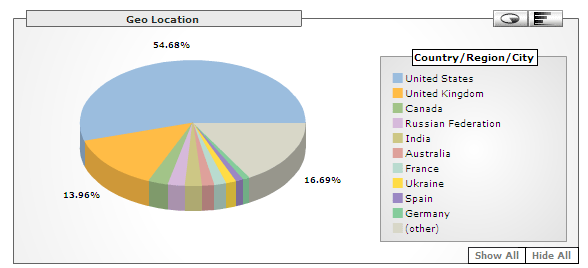
I'm getting more and more international Blog_Mail and Insiders subscribers, and about 20% of all $50 Projects come from Europe.
I've also been getting more and more emails from individuals in the United States and overseas, who'd like to essentially either be a franchisee or reseller of my services. Here's my standard answer:
I do this as a hobby. I make very little money, and in fact, if I were to charge true market rates for this service ($100+ per hour) I'd probably not get enough projects to write about. Plus, I've got a "real job", so I can't spend 50 hours per week on this.
If anyone out there would like to be a franchisee, I'm sorry, but I'm not interested. However, if you'd like to be a contributing programmer/solution provider to keep your skills sharp, email me and I can add you to my growing list of "helpers". How this works is when I get requests for $50 Projects that I am not interested in doing, or I don't have the time for, or I can't figure out myself, I email my list of helpers. If one of them can figure it out, I let them do it, and they email me the solution. I pay them $40, I keep the rest.
If anyone out there would like to be a reseller of Excel_Geek services, again I'm not interested in setting up a formal program. However, if you set up a service whereby you offer to do Excel/VBA projects for, say $100 each, and then turn around and request those projects of me for $50, I can't do anything to stop you. However, know that my standard terms will be in effect.
Later,
Excel_Geek
Tuesday, January 17, 2006
Work Around for 1024 Character Per Cell Display Problem
Here's a recent $50 Project Request that I got from Mike:
Mike was going to use Excel to log transcripts of videos, but he kept running into Excel quirky little 1,024 character display issue. Everyone's probably aware of the current versions of Excel's 1,024 character per cell display problem, right? If you aren't, here's the jist: In Excel '97, '00, '02 and '03, a cell can contain up to 32,767 characters. However, if a cell contains more than 1,024 characters, the following rules apply:
- Characters after approximately the 1,024th character do not appear in the cell; however, they appear in the formula bar when you edit or select the cell.
- Although characters after approximately the 1,024th character do not appear, you can detect and manipulate them with worksheet functions (for example, the RIGHT and MID functions) and macro commands (for example the Characters property).
- If you copy a cell that contains more than 1,024 characters, and then paste them in another cell, all of the characters are pasted into the new cell. However, characters after approximately the 1,024th character do not appear in the destination cell.
- Characters in a cell after approximately the 1,024th character are not printed and may not appear in print preview.
- You may be able to see more than 1,024 characters by increasing the row height and column width of the worksheet, by modifying the display settings of the system, and/or by inserting strategically place hard character returns (ALT+ENTER).
Here's a nice Microsoft article on the topic, if you're interested.
Now, Excel 12 will not have this issue, but Mike likely didn't want to wait for its release then immediately shell out the bucks to upgrade everything, so I set out to write some code that would patch together a clever work around to this problem.
What I basically did was write a macro that would check each cell in the column containing the transcript texts (which are the ones regularly pusing the limit) to see if any of them contained more than 1,024 characters. If one did, I'd add a new row below that one, truncate the long text at 1,024 characters, and place the remainder in the new cell directly below the first one (and repeat if necessary). Then I'd merge the top and bottom cells in all the other columns and format the cells containing the long text so that they visually seemed to be one cell.
Pretty crude, but works great. An intersting note, the .text property of a cell containing the long text only returns the first 1,024 characters, but the .value property returns the actual contents of the cell.
What did Mike end up doing in the end? Well...unfortunately, he decided to use a different program for logging called LLama Log that interfaces with Final Cut Pro quite well and has added some added features that he couldn't readily get in Excel.
Oh well. If anyone else out there wants the project...it's only $50. But of course Excel_Geek Insiders subscribers get all my projects for only $39.95 per year. Sign up today!
Excel_Geek
Thursday, January 12, 2006
UPDATE II on Google API Project
Thought I'd pass along an interesting development with the Google API project requested by S_ _ _ _:
I have been contacted by another party who has alerted me to potential intellectual property issues surrounding this project. I'll not be identifying this party, nor will I make any statements relative to the exact nature of this party's claims, nor my perception of the validity of their claims.
Suffice it to say that I'll not be pursuing this project for hire at this time.
Sorry, S_ _ _ _. $50 isn't worth the risk.
Excel_Geek


