James liked the last project so well, he requested another one right away. Thank you, James. For your reward for being a loyal customer, I placed your project at the front of the line (plus I was still in that web query mindset.)
For this project, he had many more different securities to lookup and return values for. I used Excel's built-in web query functionality, again, to do some of them, but also got a regular expression and the HTTP object to directly query some of the pages (ones on Yahoo Finance) directly, which is faster and just plain cooler.
James wanted the query to run every X minutes, which he wanted to be able to set himself. I was banging my head against the wall trying to figure out how to have one button launch a never-ending loop macro that paused for the set duration and have another button accessible to the user to stop the process. None of the methods used by others were working for me (perhaps due to the nature of the web querying going on). James settled for having one button to run the query once, and he'd click it again to run it again.
I believe I've figured out how to do his initial request, though. I was thinking about the problem wrong (as is the case in most/all such instances). Instead I needed a macro that would automatically run on file open, then stop completely for a set duraction (giving the user access to manipulate the file/run other macros), then run again, and repeat. I used the Application.OnTime method, and I think it's pretty slick. One thing, though, is that the time it takes to run all of the queries is included in the delay time, so plan accordingly.
Who else has $50?
Tuesday, October 18, 2005
Another web query-related $50 Project

Monday, October 17, 2005
New web query-related $50 Project
James (a much-appreciated repeat customer) requested a project on Friday that involved automating a weekly process of going to four different websites (one for each of four different mutual funds) and retrieving the effective 7-day yields for the funds and placing them in a newly added column in an Excel worksheet.
My initial plan was to use VBA to create web calls that returned the text for each of the four pages, then use four different regular expressions to match the data desired and return it, placing in the worksheet. However, I ran into a bit of trouble with the regular expression part of it, so I instead utilized the web query functionality built into Excel to retrieve the entire tables of data on each web page, then simply used cell referencing to place the data where it is to be stored in the worksheet.
In the end the results are identical, though I think performance suffered a bit. Total processing time (on broadband) takes about 5-6 seconds, while if I'd gotten my initial plan to work, it would likely have been 1-3 seconds.
I think I'll take another stab at doing those regular expressions (just for my own sake), and I'll share them with James if I make them work.
Thanks, James.
Everyone else, keep those $50 Project requests coming!
Friday, October 14, 2005
Getting more requests for Excel dashboard-type solutions
Everybody,
I have recently be getting quite a few requests for Excel "dashboard"-type solutions -- New York Jan, Washington (State) Stewart, West Virginia Doug, most recently. That is, what people seem to want are quick, easy one or two page reports that quickly condense down the most important metrics that concern them -- be they sales figures, units sold, inventory counts, daily trading volume, etc.
I'll keep cranking these out as fast as I can, but I do feel obliged to tell you that my good friend Charley Kyd's Excel Dashboard Kit is available for $0.05 less than my $50 fee, and it incudes her 150-page e-book, Dashboard Reporting With Excel, all the files created for the book, many example dashboard reports, two workbook databases, which contain actual performance information for Microsoft and Wal-Mart, and her special "Postage Stamp" report that can display 110 charts on one printed page, which uses a well-documented macro that populates the report page.
Now, I realize that what makes my $50 Project service attractive to many people is that they don't want to have to spend hours submitting questions to user forums, waiting and hoping for someone to answer their question, hoping the answer is correct, and trying to decipher the instructions, etc. They simply have a problem that needs solved and they want it solved now. If they learn how the solution was created, that's merely a bonus. (For those of you who haven't requested a $50 Project and received the solution, I do include meticulous documentation, explanation, and instructions in my solutions.)
Realizing this, if you simply want a dashboard-type solution created for you, or if you would like a starting point from which you can learn, I'll happily do it for you for $50, but just know that you can buy Charley's kit for $49.95, and have all you need to create and modify all the dashboard reports you'll ever need.
Now I'm off to crank out some $50 projects. Keep 'em comin'!
Friday, October 07, 2005
Just learned of this super nice online personal finance service from Mvelopes
Hey MS Money and Quicken users, like so many other software products out there, a new, web-based personal finance alternative is now available, and it blows away the desktop-chained relics.
Mvelopes Personal is an online budgeting system that makes it easy to create an effective personal budget and track every aspect of your spending as it happens. It will help you always know exactly how much you have left to spend, instantly know the impact of every spending decision, effectively manage credit card spending, and quickly create an easy to use household budgeting plan. Click here to learn more

Thursday, October 06, 2005
Adding a PayPal "Pay the Geek" button

Update on Canada John's golf league project
I recently sent Canada John version 2 of his golf league score input system. Things added in were automatic point (individual and team) calculation based upon the league's rules, pars & handicaps of each hole, and handicap differentials of the two players pitted against each other.
I also added in a feature to automatically fill in the all-pars hole scores for the defualt "play against the course" player to reduce data entry.
Also, to reduce data entry, I added a schedule where John can specify on a week-by-week basis which teams are playing against each other and what they're starting holes are. Then, all John needs to do is set the week number and the starting hole, and the teams automatically fill in. Then he auto-populates each team and deletes moves players as needed, auto-fills in the "course" player (if needed), inputs the hole-by-hole scores, and submits the scores to be archived for use in calculcating individual and team points standings as well as maintaining up-to-date individual player handicaps based upon the gross scores.
I already have ideas for v 3.0: string together some macros to further stream line data entry -- e.g. "Submit scores + clear scores and player names + move to next hole + auto-populate teams" would save a few clicks. Also, I'd like to create the weekly summary page and overall standings pages that can be published to the web in the way John does is now.
All of this I'm doing in between the flow of other projects, many of which are too boring to mention...but they're still worth $50.
Who else has $50?
Monday, October 03, 2005
Quickie Project - Yahzee® scorecard for my wife
We ran out of Yahtzee® scorecards at home, so I whipped this one up real quick...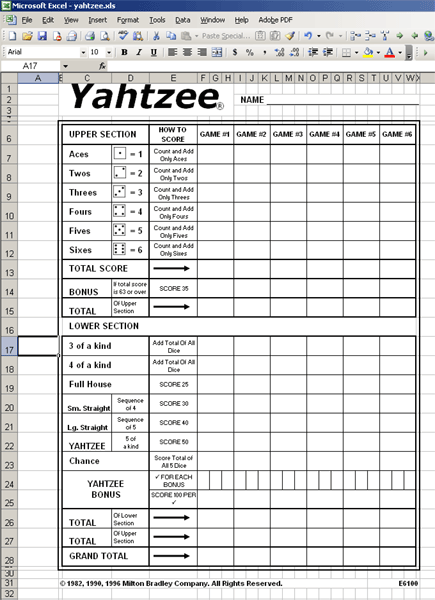
I stuck four of them on a single 8.5"x11" sheet, and while they're a touch smaller than the originals, they work just fine...
(Amber, you owe me $50.)


